
Introduction and Context
Maintaining an updated mobile gaming application is essential for securing your financial transactions, experiencing the latest game releases from providers like JILI and PG Soft, and enjoying smooth, bug-free performance. In Bangladesh, where online casino applications are distributed outside the Google Play Store, updates cannot rely on the Play Store's automatic background update queue.
Instead, players keep their applications current through two primary mechanisms: seamless Over-The-Air (OTA) in-app auto-updates, or manual package upgrades via direct APK downloads from the official website. Knowing how to execute both methods safely ensures you never miss critical security patches or experience unexpected downtime. This guide details the step-by-step procedures for updating your Android app.
However, downloading and installing mobile packages directly requires careful attention to file integrity, SHA-256 digital checksums, mobile permissions, and network stability. When staking Bangladeshi Taka (BDT) funded via personal mobile banking accounts like bKash and Nagad, ensuring your mobile application is authentic and bug-free protects both your bankroll and your personal data. This comprehensive technical guide covers the installation, optimization, troubleshooting, and security protocols for updating the android apk safely.
Specifications and Operational Parameters
Step-by-Step Installation and Operational Procedures for Updating the Android APK Safely
Follow these procedures to keep your mobile application updated:
Method 1: Performing an In-App Over-The-Air (OTA) Update (Recommended)
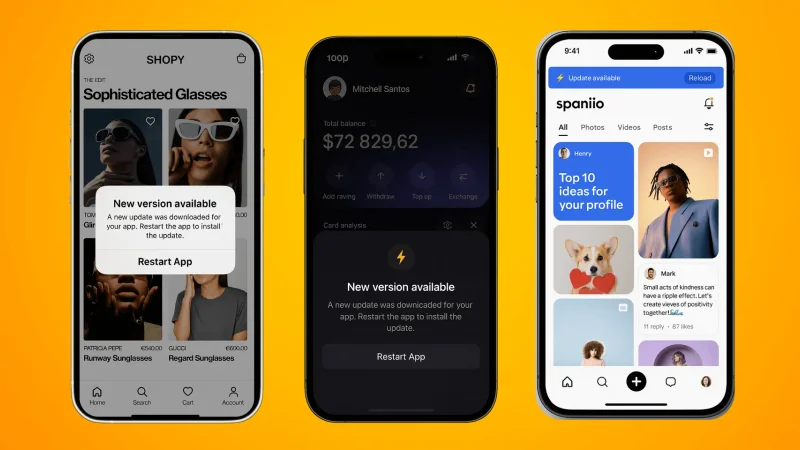
- When a new version is released, an update dialog will appear automatically when you launch the app, displaying the new version number and changelog.
- Tap Update Now on the dialog. The app will download the lightweight delta patch in the background.
- Once downloaded, a system prompt will ask: "Do you want to install an update to this application?"
- Tap Install. The update will apply without deleting your saved preferences or logging you out. Tap Open to continue playing.
Method 2: Performing a Manual APK Upgrade
If an in-app update fails due to network interruption or if you are upgrading from an older major version:
- Open your mobile browser and visit the official website.
- Download the latest official APK package from the homepage download link.
- Once downloaded, open the file from your notification bar or Files app.
- Android will recognize the existing installation and prompt: "Do you want to install an update to this existing app? Your existing data will not be lost."
- Tap Install. The new version overwrites the older package cleanly, preserving your account data and settings.
Technical Architecture: APK Signatures, RAM Allocation, and OS Compatibility
The technical mechanics of delta updates and cryptographic package signing:
- Delta Patch Architecture: For minor updates, the application does not re-download the entire 28.4 MB package. Instead, it utilizes binary delta patching, downloading only the specific code files and game assets that have changed. This reduces update download times and conserves mobile data packs.
- Package Signature Verification: Android enforces strict cryptographic signature matching. You can only update an existing app if the new APK is signed with the exact same private developer key as the original installation. If a malicious third party attempts to distribute a fake update, Android's package manager rejects the installation immediately with a "Signature Mismatch" error.
Common App Errors, Installation Failures, and Practical Troubleshooting
Avoid these common update errors:
Error 1: "App Not Installed as Package Conflicts with an Existing Package"
This error indicates a signature mismatch. It occurs if your original app was downloaded from an unverified third-party site and you are now attempting to install the genuine official build. To fix this: uninstall the old app completely, restart your phone, and install the official build cleanly.
Error 2: Update Download Stalling at 99%
If an in-app update stalls near completion, unstable mobile data or full phone storage is the typical cause. Free up at least 100 MB of internal storage and switch from mobile data to a stable WiFi network before retrying.
Error 3: Accepting Updates from Unsolicited Popups
Never tap on random pop-up banners on third-party websites claiming: "Your casino app is out of date! Click here to update." Genuine updates are prompted exclusively inside your installed application or downloaded directly from the official portal.
Application Security, Permission Audits, and Malware Prevention
Application updates are compiled and cryptographically verified under Curaçao eGaming regulatory oversight. Every update build is independently audited by Gaming Laboratories International (GLI) to ensure that game logic, payout percentages, and security protocols remain intact and fully compliant with international standards.
Digital Wellbeing, Screen-Time Management, and Responsible Mobile Play
Software updates frequently introduce new games, features, and promotional banners that can stimulate excitement. Keep your gaming structured and deliberate by sticking to your predetermined budget.
If you ever feel that gaming is taking up too much of your time or energy, take advantage of built-in account limit tools and consult BeGambleAware or GamCare for confidential advice.
Regional Operational Context and Practical Advice for Bangladesh
Best Practices and Player Protection Guidelines
- Maintain Method Discipline: Consistently execute deposits and cashouts using the same verified mobile financial wallet. Frequent switching between multiple personal wallets or third-party accounts triggers automated anti-fraud security audits and delays payment approvals.
- Document Every Financial Step: Keep organized screenshots of cashier payment forms, completed mobile banking transaction receipts, and final balance updates until each gaming session concludes.
- Protect Mobile Device Integrity: Ensure your smartphone operating system is updated with the latest security patches, avoid installing unverified third-party utility applications, and enable biometric fingerprint authentication on your mobile wallet applications.
- Recognize When to Step Away: Online entertainment should never be treated as an avenue for earning income or solving personal financial difficulties. If you ever find yourself wagering beyond your predetermined entertainment budget or feeling anxious about session outcomes, make immediate use of the platform's voluntary self-exclusion and cooling-off tools.
Related Guides & Resources
Official APK Download Guide
Download the latest production build package.
Read Guide →App Version History & Risks
Understand the risks of running legacy builds.
Read Guide →Android Installation Walkthrough
Complete unknown sources installation instructions.
Read Guide →Frequently Asked Questions
No. Updating the application overwrites only core program files. Your account balance, active bets, and settings are preserved on the central cloud server.
For minor visual updates, you can often defer. However, critical security patches and core banking updates must be installed to continue accessing real-money games.
Open the app, navigate to Profile > Settings > About, and compare your version number with the latest build listed on the official website.
This occurs if your existing app was installed from an unofficial third-party source. Uninstall the old app completely and download the genuine build from the official website.
Standard in-app OTA updates typically consume only 5 to 15 MB of data, making them fast and affordable over mobile data plans.
Progressive Web Apps (PWAs) on iOS update automatically on the server side every time you launch the app, requiring no manual downloads.
Yes. In-app updates are delivered over encrypted HTTPS channels, ensuring file integrity over cellular connections.
Official Regulatory & Player Protection Authorities
- Official APK Download Guide — Download the latest production build package.
- App Version History & Risks — Understand the risks of running legacy builds.
- Android Installation Walkthrough — Complete unknown sources installation instructions.
- Curaçao eGaming — Regulatory licensing authority supervising mobile gaming compliance.
- Gaming Laboratories International — Independent testing laboratory for mobile casino software and RNG.
- eCOGRA — Payout percentage verification and mobile platform security certification.
- BeGambleAware — Free player protection support and responsible mobile gaming guidance.
- GamCare — Confidential counseling and treatment for mobile gaming habit management.