
Introduction and Context
While Android dominates the smartphone market share in Bangladesh, Apple iPhone and iPad devices represent a rapidly expanding segment, particularly among urban professionals and high-volume gaming enthusiasts. However, Apple's strict App Store review guidelines strictly prohibit real-money online casino and sports betting applications across non-regulated territories, meaning iOS users cannot download a native IPA file from the App Store.
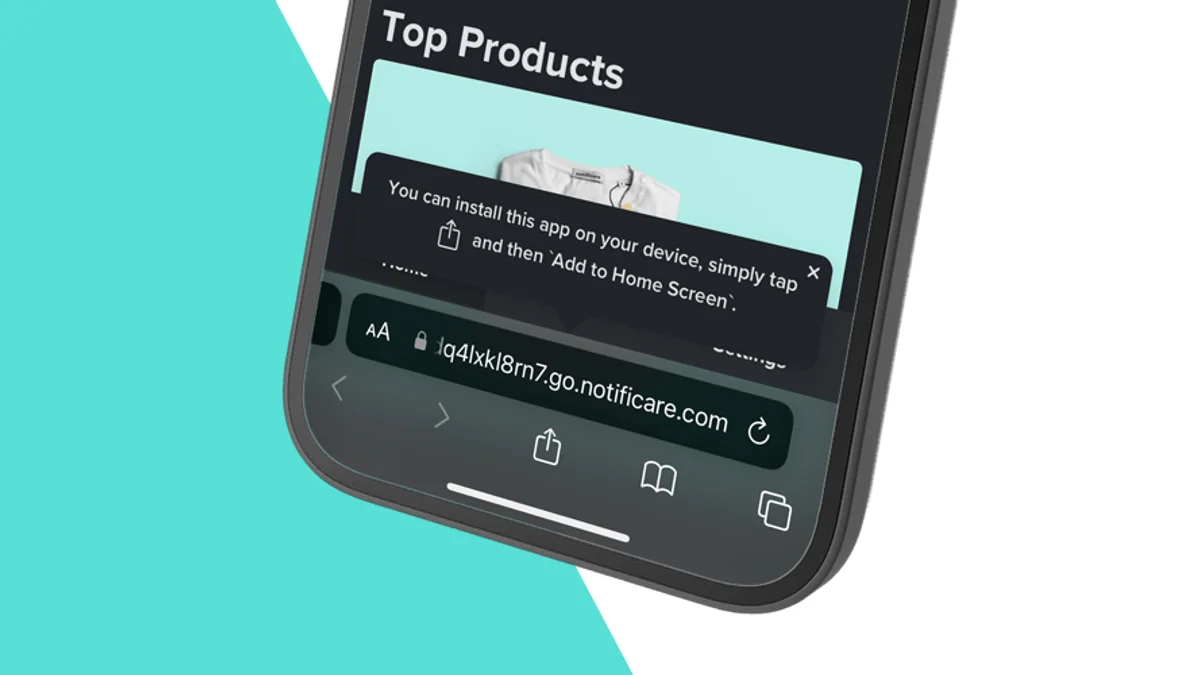
To provide iPhone users with an experience identical to a native application, modern gaming platforms utilize Progressive Web App (PWA) technology. By leveraging Apple's WebKit rendering engine inside Safari, you can install a full-screen, standalone web app directly onto your iOS home screen. This comprehensive guide details how to install, configure, and optimize the iOS web app on iPhone and iPad devices.
However, downloading and installing mobile packages directly requires careful attention to file integrity, SHA-256 digital checksums, mobile permissions, and network stability. When staking Bangladeshi Taka (BDT) funded via personal mobile banking accounts like bKash and Nagad, ensuring your mobile application is authentic and bug-free protects both your bankroll and your personal data. This comprehensive technical guide covers the installation, optimization, troubleshooting, and security protocols for ios apple progressive web app (pwa).
Specifications and Operational Parameters
Step-by-Step Installation and Operational Procedures for iOS Apple Progressive Web App (PWA)
Follow this straightforward procedure to install the web app on your iPhone or iPad:
Step 1: Open the Official Website in Apple Safari
Launch the native Safari browser on your iPhone. (Important: You must use Safari; third-party iOS browsers like Chrome or Firefox cannot install PWAs to the iOS home screen due to Apple operating system limitations). Navigate to the official TK666 web portal.
Step 2: Access the Safari Share Sheet
Once the website loads completely, look at the bottom toolbar in Safari and tap the Share icon (represented by a square with an upward-pointing arrow).
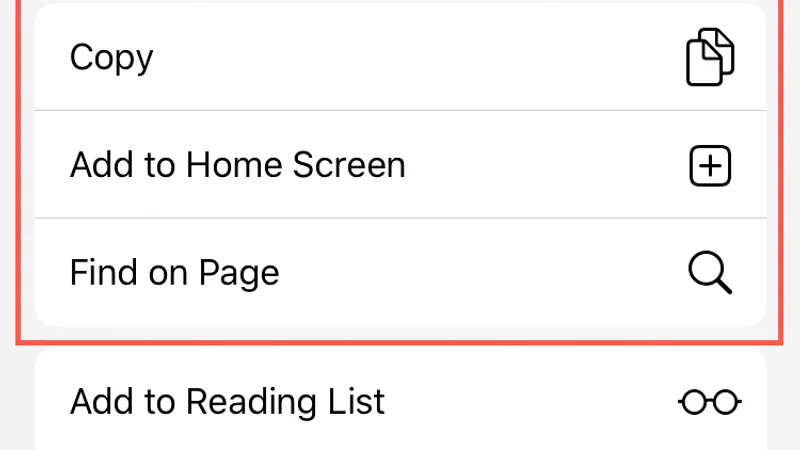
Step 3: Select "Add to Home Screen"
Scroll down the list of options in the Share Sheet and tap Add to Home Screen. A preview dialog will appear displaying the official TK666 app icon and title. You can keep the default title or customize it.
Step 4: Tap Add to Finalize Installation
Tap Add in the top-right corner. Safari will close, and an official TK666 icon will appear on your iPhone home screen. Tapping this icon launches the platform in a dedicated, full-screen standalone window—completely removing the Safari search bar, navigation buttons, and tab controls for an immersive app experience.
Technical Architecture: APK Signatures, RAM Allocation, and OS Compatibility
The technical advantages of Progressive Web Apps on Apple iOS:
- WebKit Engine Performance: Modern iPhones powered by Apple A-series Bionic and M-series chips deliver industry-leading JavaScript execution speeds. Slot animations, live dealer video streams, and interactive betting interfaces render smoothly with minimal battery consumption.
- Zero Storage Footprint: Unlike traditional native apps that consume hundreds of megabytes of flash storage for binary packages and media assets, a PWA operates through dynamic browser caching. It uses less than 2 MB of persistent storage while delivering identical visual fidelity.
- Instant Server-Side Updates: You never need to download manual update packages or install new versions. Every time you launch the home screen icon, the PWA automatically fetches the latest features, security patches, and game catalogs directly from the server.
Common App Errors, Installation Failures, and Practical Troubleshooting
Avoid these common iOS setup mistakes:
Mistake 1: Attempting Installation via Google Chrome for iOS
Apple restricts home screen web app installation capabilities exclusively to its native Safari browser. Tapping the share menu in Chrome or Brave will not display the "Add to Home Screen" option for PWA mode.
Mistake 2: Launching with "Private Browsing" Enabled
If Safari is operating in Private Browsing mode when you add the bookmark, your session cookies and login credentials cannot be saved, requiring you to log in repeatedly every time you open the app. Add the app from a standard Safari tab.
Mistake 3: Accidentally Deleting Safari Website Data
Going to iOS Settings > Safari and tapping "Clear History and Website Data" will clear the PWA's cached credentials. If this occurs, simply reopen the home screen icon and log in once to re-cache your credentials.
Application Security, Permission Audits, and Malware Prevention
Progressive Web Apps operate inside Apple's strict iOS WebKit sandbox, making them among the safest software environments available. Because the PWA cannot execute arbitrary code outside Safari's security architecture, your iPhone is completely protected against malware. Regulatory compliance is maintained under Curaçao eGaming supervision and audited by eCOGRA.
Digital Wellbeing, Screen-Time Management, and Responsible Mobile Play
The accessibility of a one-tap home screen shortcut can make launching gaming sessions habitual. Take advantage of iOS Screen Time controls (Settings > Screen Time) to set an App Limit on Safari or your web app shortcut.
If you or someone you care about is struggling to manage their gambling habits, seek free, confidential assistance from BeGambleAware and GamCare.
Regional Operational Context and Practical Advice for Bangladesh
Best Practices and Player Protection Guidelines
- Maintain Method Discipline: Consistently execute deposits and cashouts using the same verified mobile financial wallet. Frequent switching between multiple personal wallets or third-party accounts triggers automated anti-fraud security audits and delays payment approvals.
- Document Every Financial Step: Keep organized screenshots of cashier payment forms, completed mobile banking transaction receipts, and final balance updates until each gaming session concludes.
- Protect Mobile Device Integrity: Ensure your smartphone operating system is updated with the latest security patches, avoid installing unverified third-party utility applications, and enable biometric fingerprint authentication on your mobile wallet applications.
- Recognize When to Step Away: Online entertainment should never be treated as an avenue for earning income or solving personal financial difficulties. If you ever find yourself wagering beyond your predetermined entertainment budget or feeling anxious about session outcomes, make immediate use of the platform's voluntary self-exclusion and cooling-off tools.
Related Guides & Resources
Android APK Download Guide
Download parameters for Android smartphones.
Read Guide →Mobile Security Essentials
Protect your device and mobile banking wallets.
Read Guide →Mobile App Hub Overview
Return to the central mobile application hub.
Read Guide →Frequently Asked Questions
No. Apple restricts real-money gaming apps in the regional App Store. The official iOS solution is the Safari Progressive Web App (PWA).
Yes. Apple's Safari auto-fill keychain integrates directly with Face ID and Touch ID to populate your saved login credentials securely.
Ensure you opened the website in Apple Safari, not Google Chrome, Opera, or in-app social media browsers like Facebook or Telegram.
Yes. The full cashier interface—including bKash, Nagad, Rocket, and Upay—operates seamlessly within the iOS web app.
No. The PWA utilizes lightweight cloud-based caching, requiring less than 2 MB of storage on your iPhone.
No. PWA updates are applied server-side automatically. The app always displays the freshest version every time you launch it.
Yes. The high-resolution iPad display is ideal for live dealer casino streams, offering multi-camera angles and full-screen betting grids.
Official Regulatory & Player Protection Authorities
- Android APK Download Guide — Download parameters for Android smartphones.
- Mobile Security Essentials — Protect your device and mobile banking wallets.
- Mobile App Hub Overview — Return to the central mobile application hub.
- Curaçao eGaming — Regulatory licensing authority supervising mobile gaming compliance.
- Gaming Laboratories International — Independent testing laboratory for mobile casino software and RNG.
- eCOGRA — Payout percentage verification and mobile platform security certification.
- BeGambleAware — Free player protection support and responsible mobile gaming guidance.
- GamCare — Confidential counseling and treatment for mobile gaming habit management.